Notes on design & building
How I Use Codex
From my personal website to working prototypes and my own app. How building with Codex has become part of my work as a product designer.
 Alex Lohinov 10 min read
Codex has become a close part of the way I work. I use it to build websites, turn design ideas into working prototypes, and develop my own application. More and more, it sits alongside my design tools as a place where I can think through an idea by making it real.
As a product designer, I care about how something feels when a person actually uses it. A layout can look convincing in a design file, but the moment it becomes interactive, new questions appear. Does the flow make sense? Is the next action obvious? Does the interface still hold together with longer text or a smaller screen? Getting to that moment earlier is a big part of why I use Codex.
Building this website
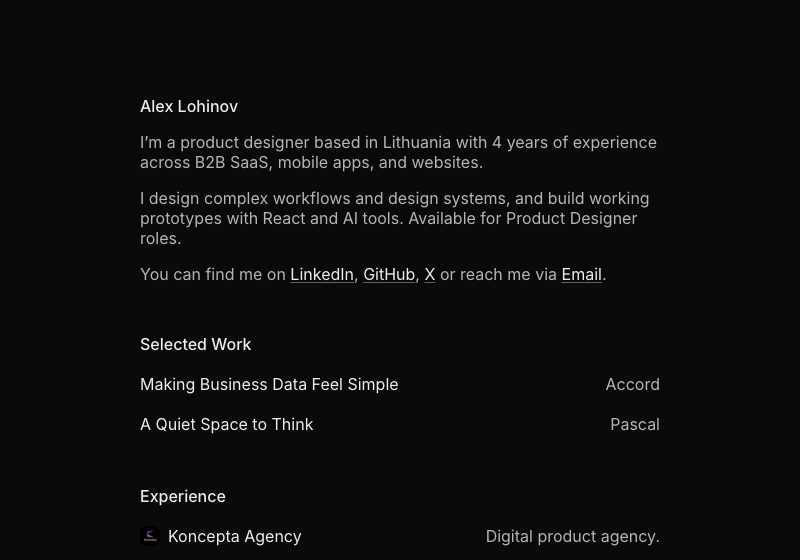
This website is a small example of that approach. I wanted a quiet place to introduce myself, share selected work, and write about how I design. The structure is intentionally simple: a short introduction, work, experience, projects, and writing. The content should be the first thing you notice.
From design to browser
I started with the visual direction in Figma, then worked with Codex to turn it into a website. The implementation uses React, TypeScript, Vite, and plain CSS. It is a small foundation that lets me add pages and adjust the details without creating a complicated system around a personal site.
The interesting part was translating the intent of the design. The narrow column, the spacing between sections, the subdued secondary text, and the small project icons all contribute to the same feeling. I wanted the browser version to retain that simplicity, including on a phone.
Working through the details
Once the basic page existed, the work became more specific. Social links should open in a new tab. Clicking my email should copy the address and give clear feedback. A project that is not ready yet should not lead to a broken page. These are small decisions, but together they make a website feel considered.
I could describe each change, try the result, and refine it. The site grew in the same way: first the profile, then a sample case study, then this article and a navigation tree for longer pages. I like being able to evolve it through small, concrete improvements.
Prototypes I can actually use
I also use Codex to make working prototypes. For me, the value is in moving beyond a sequence of screens and exploring how a design behaves. A prototype becomes much more useful when I can type into it, change a selection, move between views, and see the interface respond.
That gives me another way to evaluate my own work. With a static screen, I am imagining the interaction. With a working version, I can notice the awkward transition, the missing state, or the extra step. It is easier to have a precise conversation about a flow when there is something to try.
I want the prototype to answer a design question. For a search experience, that might mean exploring the relationship between the query, the results, and the empty state. For a multi-step flow, it might mean checking whether people have enough context to move forward. The useful level of detail depends on what I am trying to learn.
A person starts with a question.
The interface gives useful feedback.
There is a clear way forward.
Building my own app
I have also created my own application with Codex: a private, local place to save media files, links, documents, and notes. It brings the things I want to keep into one space, with everything stored locally. Privacy is part of the starting point for the product.
That feels like an important extension of my design practice: taking an idea beyond a set of screens and working through what it takes for those screens to become a product. A saved link, a document, and a short note are different kinds of content, but they need to feel at home in the same interface.
When it is my own app, I have to think about the connections between decisions. What is the main action? What information belongs in each view? What happens before there is any content? How does someone get back after taking a wrong turn? The experience has to make sense as a whole.
Codex helps me move between those questions and a working implementation. I can stay close to the product decisions while exploring how they behave in practice. That does not make the decisions automatic; it gives me a more direct way to test and improve them.
My working process
The loop I keep coming back to is simple: explain the intent, build a small piece, try it, and refine it. The more clearly I can describe what I am trying to achieve, the more useful the collaboration becomes.
Give it context
I find it useful to start with the person using the interface, the task they need to complete, and the constraints that matter. A reference screen helps communicate the visual direction. Existing components and styles help keep a new piece consistent with the rest of the product.
For this website, the direction is a narrow reading column, restrained typography, generous spacing, and very little decoration. Describing those choices makes a request more concrete than simply asking for something “minimal.”
An example of the kind of brief I meanAdd an article page that feels like the rest of my website. Keep the reading column narrow, use the existing type and colors, and add a navigation tree. On mobile, make the contents easy to open without taking space away from the text.
Build, try, refine
I prefer a small first version that I can react to. Once I can use it, my feedback becomes more precise: this paragraph is too wide, that control needs clearer feedback, this state is missing, or the navigation takes up too much room on a phone.
The browser is part of that process. I want to see the actual line breaks, follow the links, resize the page, and try the main path through the interface. A successful build is useful, but it does not tell me whether the experience feels right.
I also want the implementation to stay understandable. Smaller changes are easier to review and easier to revisit. On a personal project, that matters because I will keep returning to it with new ideas.
Where my judgment matters
I still need to decide what is worth building, which problem matters, and whether the result is good enough. A working interface can be the wrong solution. A polished prototype can still make the task harder than it needs to be.
My role is to keep asking those questions: does the hierarchy reflect what matters? Is the language clear? Are the interactions consistent? Can someone use it without me explaining it? Codex gives me more room to explore the implementation, and I bring the product context and design judgment to the decisions.
I also want to keep a clear distinction between an exploration and a finished product. Sample data is useful for testing a layout. A real product asks for more: real content, less predictable inputs, and a careful look at how everything behaves beyond the ideal path.
What this changes for me
Using Codex closely in my work has made building a more natural part of designing. I can take a question that appears in a design file and explore it in a working interface while the context is still fresh.
This website, my prototypes, and my own app are different expressions of that same habit. I have an idea, make a version I can use, and let the result inform the next decision.
That is what I want to keep developing: a design practice where the distance between an idea and something useful gets smaller, and where I stay involved in the details all the way through.